 |
|
|
 |
|
| قسم الميكروكنترولر والروبوت ودوائر الاتصال بالحاسب الالي قسم المتحكمات الـ microcontroller و المعالجات microprocessor و التحكم الرقمي بالكمبيوتر CNC والانظمة الآلية والروبوت Robots |
|
|
|
||||||

تدريب تمهيدى رقم 4 : استخدام أربع وحدات سفن سيجمنت بتقنية الانتخاب Multiplexed : فى هذا التدريب سوف نتعلم كيفية استخدام أربع وحدات سفن سيجمنت متصلة على التوازى مع منفذ الميكروكونترولر عن طريق تقتية الانتخاب . سوف نستخدم أربع وحدات كاثود مشترك ، حيث يتم توصيل الشرائح على التوازى بأطراف المنفذ PORTB ، ويتم توصيل خطوط التحكم فى وحدات الآحاد والعشرات والمئات والآلاف عن طريق المنفذ PORTD ، وسوف يتم عرض العدد “1234” . الدائرة الكهربية : 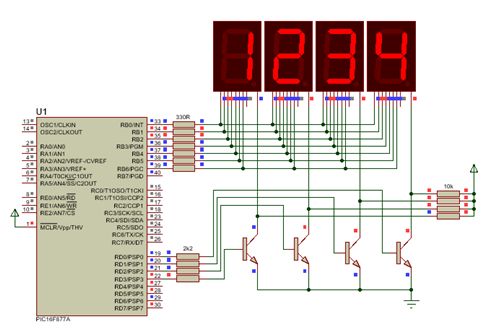 البرنامج : كود:
#define Digit1_Enable RD0_bit
#define Digit2_Enable RD1_bit
#define Digit3_Enable RD2_bit
#define Digit4_Enable RD3_bit

//
// this function forms the bit pattern corresponding to a number between
// 0 and 9. this bit pattern is returned to the calling program
//
unsigned char Display_Segment(unsigned char Number)
{
unsigned char SevenSegment[] =
{0x3F,0x06,0x5B,0x4F,0x66,0x6D,0x7D,0x07,0x7F,0x6F};
unsigned char Disp;
Disp = SevenSegment[Number]; 		// Get bits of the number to be displayed
return (Disp); 				// Return bits to main program
}
//
// Start of main program
//
void main()
{
unsigned int Num = 1234;
unsigned char Digit1_Data,Digit2_Data, Digit3_Data, Digit4_Data ;
TRISB = 0; 							// PORT B pins are outputs
TRISD = 0; 							// PORT D output
Digit1_Enable = 0; 						// Disable Digit1 to Digit4 as start
Digit2_Enable = 0;
Digit3_Enable = 0;
Digit4_Enable = 0;
for(;;)								 // DO FOREVER
{
Digit4_Data = Num / 1000; 				// Extract Digit4 data ,(1)
Digit3_Data = (Num/100) % 10; 			// Extract Digit3 data ,(2)
Digit2_Data = (Num / 10) % 10; 			// Extract Digit2 data ,(3)
Digit1_Data = Num % 10; 				// Extract Digit4 data ,(4)

PORTB = Display_Segment(Digit1_Data); 	// Send LSD number (4) to port
 Digit1_Enable = 1;
 Digit2_Enable = 0;
Digit3_Enable = 0;					// Enable Digit1
Digit4_Enable = 0;
Delay_Ms(5);						 // Wait 5ms
Digit1_Enable = 0; 					// Disable Digit1

PORTB = Display_Segment(Digit2_Data); 	// Send MSD number (3) to port
Digit2_Enable = 1;					 // Enable Digit2
Digit1_Enable = 0;
Digit3_Enable = 0;
Digit4_Enable = 0;
Delay_Ms(5); 					// Wait 5ms
Digit2_Enable = 0;					 // Disable Digit2

PORTB = Display_Segment(Digit3_Data); 	// Send MSD number (2) to port
Digit3_Enable = 1;					 // Enable Digit3
Digit1_Enable = 0;
Digit2_Enable = 0;
Digit4_Enable = 0;
Delay_Ms(5); 					// Wait 5ms
Digit3_Enable = 0;					 // Disable Digit3

PORTB = Display_Segment(Digit4_Data); 	// Send MSD number (1) to port
Digit4_Enable = 1;					 // Enable Digit4
Digit1_Enable = 0;
Digit2_Enable = 0;
Digit3_Enable = 0;
Delay_Ms(5); 					// Wait 5ms
Digit4_Enable = 0;					 // Disable Digit4

}
}
|
| F.Abdelaziz |
| مشاهدة ملفه الشخصي |
| زيارة موقع F.Abdelaziz المفضل |
| البحث عن كافة المشاركات المكتوبة بواسطة F.Abdelaziz |
| اعلانات |
|
||||||
|
تطبيق : عداد تصاعدى من 0 إلى 9999 والعرض على أربع وحدات سفن سيجمنت : مرة أخرى مع تقنية الانتخاب multiplexing ، والتى تعتمد على الخداع البصرى لعين الإنسان . فعين الإنسان لا يمكنها كشف التغيرات البصرية عند معدل 25 إطار (صورة) كل ثانية 25 frames/sec (التردد). هذا يعنى أى تغيرات فى فرق زمنى أقل من 1/25 sec (الزمن الدورى) لن تستطيع العين ملاحظتها . يستخدم هذا المفهوم فى تقنية الانتخاب Multiplexing لوحدات السفن سيجمنت المتعددة . فى هذا التدريب سوف نستخدم 4 وحدات سفن سيجمنت ، وحدة واحدة فقط هى التى تكون فى حالة تسغيل ON فى وقت ما ، ولكن يتم تغيير حالة التشغيل والفصل ON/OFF بسرعة كبيرة بين الوحدات لخلق الانطباع بأن جميع الوحدات تكون فى حالة توصيل ON فى نفس الوقت . الدائرة الكهربية : 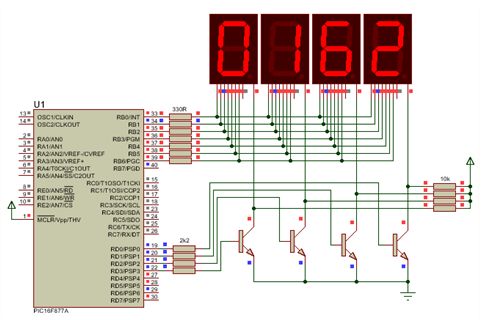 يتم توصيل شرائح وحدات السفن سيجمنت إلى المنفذ PORTB ، وتوصيل الكاثودات المشتركة عن طريق ترانزستورات (والتى تعمل كمفاتيح) إلى المنفذ PORTD . البرنامج : يتم إرسال رقم الآحاد Units إلى وحدات السفن سيجمنت من خلال المنفذ PORTB ، ويتم تشغيل ON الترانزستور الأول فى نفس الوقت ، وبعد وقت قصير يتم فصل OFF هذا الترانزستور . بعد ذلك يتم إرسال رقم العشرات Tens إلى وحدات السفن سيجمنت من خلال المنفذ PORTB ، ويتم تشغيل ON الترانزستور المناظر فى نفس الوقت ، وبعد وقت قصير يتم فصله OFF . يتكرر نفس العمل لكل من رقم المئات hundreds ورقم الآلاف thousands . تتكرر العملية كلها باستمرار عند سرعة عالية ولجميع الأرقام والترانزستورات المناظرة . كود:
/**********************************
 Multiplexing of 7 segment display with PIC16F877A
This project demonstrate multiplexing of 4X7 segment display.
it counts from 0000 - 9999
***********************************/
unsigned char units,tens,hundreds,thousands ;
unsigned int counter = 0;
unsigned int digit = 0;


 unsigned char display(unsigned char digit1)
 {

   unsigned char my_digit;
   unsigned int array[10] = {0x3F,0x06,0x5B,0x4F,0x66,0x6D,0x7D,0x07,0x7F,0x6F}; // array holding common cathode 7 segment look up table for 0-9
   my_digit = array[digit1];
   return (my_digit) ;

 }


 void short_delay()		// delay function to control how digit is incremented
 {

     if(counter<100)
	 {
      counter++  ;
      if(counter==100)
	  {
      digit++ ;
      counter = 0;
	  }
      if(digit==9999)
	  {
      digit = 0;
      }
	}
 }

void main()
{

  TRISB = 0x00;    // set PORTB as output
  TRISD = 0x00;

   PortD.F0 = 0;  //turn off PORTD bit 0-3
   PortD.F1 = 0;
   PortD.F2 = 0;
   PortD.F3 = 0;

 while(1) {

   short_delay();                    		// call delay function

   units = digit % 10 ;               	//extract units from digit
   PORTB = display(units);            	// send  units value to PORTD
   PortD.F0 = 1;                    		 // turn ON 1st 7 segment (LSD 7 Segment display)
   PortD.F1 = 0;
   PortD.F2 = 0;
   PortD.F3 = 0;
   delay_ms(1);
   PortD.F0 = 0;

   tens =  (digit / 10) % 10 ;        	//extract tens from digit
   PORTB = display(tens);              	// send tens value to PORTD
   PortD.F0 = 0;
   PortD.F1 = 1;                       	// turn ON 2nd 7 segment
   PortD.F2 = 0;
   PortD.F3 = 0;
   delay_ms(1);
   PortD.F1 = 0;

   hundreds =  (digit / 100) % 10;    //extract hundreds from digit
  PORTB = display(hundreds);          // send hundreds value to PORTD
   PortD.F0 = 0;
   PortD.F1 = 0;
   PortD.F2 = 1;                      	// turn ON 3rd 7 segment
   PortD.F3 = 0;
   delay_ms(1);
   PortD.F2 = 0;

   thousands =  digit / 1000 ;        	//extract thousands from digit
   PORTB = display(thousands);           // send  thousands value to PORTD
   PortD.F0 = 0;
   PortD.F1 = 0;
   PortD.F2 = 0;
   PortD.F3 = 1;                       	// turn ON 4th 7 segment
   delay_ms(1);
   PortD.F3 = 0;
   }
}
|
| F.Abdelaziz |
| مشاهدة ملفه الشخصي |
| زيارة موقع F.Abdelaziz المفضل |
| البحث عن كافة المشاركات المكتوبة بواسطة F.Abdelaziz |
| اعلانات اضافية ( قم بتسجيل الدخول لاخفائها ) | |
|
|
|
||||||
|
السفن سجمنت نوع الكاثود المشترك ومفسر الشفرة 7448 والميكروكونترولر PIC16F628 وعداد تصاعدى تنازلى من 00 إلى 99 : الغرض : إنشاء عداد تصاعدى / تنازلى من 00 إلى 99 يمكن أن يستخدم فى الكثير من التطبيقات مثل عد السيارت فى موقف السيارات أو عدد الأشخاص فى مكان ما . قد يشكل حساب كود السفن سيجمنت فى كل مرة شىىء من الإزعاج للبعض . هل هناك طريقة لاستخدام القيمة العشرية فقط لتعرضها السفن سيجمنت ؟ نعم ، الدائرة المتكاملة المسماة مفسر الشفرة من BCD إلى سفن سيجمنت ( 7447 للأنود المشترك و 7448 للكاثود المشترك ) تقوم بذلك نيابة عنك . الدائرة الكهربية :  سوف نستخدم الدائرة المتكاملة 7448 كمفسر للشفرة من BCD إلى سفن سيمنت ، ومن ثم يجب أن نستخدم وحدتين سفن سيجمنت نوع "الكاثود المشترك" ، ويتم توصيل الخطوط A,B,C,D,E,F,G على التوازى مع استخدام طريقة الانتخاب بين كاثودى الوحدتين . البرنامج عبارة عن عداد تصاعدى / تنازلى من 00 إلى 99 باستخدام 2 مفتاح ضاغط ( تمثل أى نوع من حساسات الدخل الرقمى المناسبة ) أحدهما للتزايد والآخر للتناقص . شرح خطوات البرنامج : 1- فى البداية يتم استخدام الموجه #define فى تعريف وإنشاء مسميات سهلة ومتعارف عليها بدلا من مسميات خاصة . على سبيل المثال تسمية طرف توصيل مفتاح التزايد PORTA.F0 باسم Up وطرف توصيل مفتاح التناقص PORTA.F1 باسم Down وهكذا ، كما يلى : كود:
#define Up PORTA.F0 // We can write Up instead of PORTA.F0 ... #define Down PORTA.F1 #define disp_unit1 PORTA.F2 // We can write disp_uinit1 instead of PORTA.F2 ... #define disp_unit2 PORTA.F3 كود:
char Number=0 , Ones , Tens ; // Variables أ- دالة العرض Display() : وهى دالة فارغة void لا تعود بقيمة وليس لها بارامترات مرتبطة بها بل يتم تنفيذ العبارات التى تحتوى عليها فقط ، وتكون بالصيغة التالية : كود:
void Display() //  Display function
{
…..
}
• قسم استخراج خانة العشرات Tens وخانة الآحاد Ones من العدد الكلى Number ، وذلك عن طريق استخدام عامل القسمة "/" وعامل باقى القسمة "%" . نتيجة "قسمة عدد صحيح على عدد صحيح أخر" (كما هو الحال هنا) تكون العدد الصحيح ويتم تجاهل الكسر أو باقى القسمة (على سبيل المثال نتيجة قسمة 5 على 3 تكون 5/3 = 1 ) فى حين أن نتيجة " خارج قسمة عدد على عدد صحيح آخر " تكون عدد صحيح هو باقى القسمة ( مثال :نتيجة باقى قسمة 5 على 3 هو 5%3 = 2 ) . وبناء على ذلك نتيجة "قسمة العدد الصحيح Number (المكون من آحاد وعشرات) على العدد الصحيح "10 تكون العدد الصحيح المناظر لخانة العشرات لهذا العدد أى Tens=Number/10 . فى حين أن نتيجة "باقى قسمة العدد الصحيح Number (المكون من آحاد وعشرات) على العدد الصحيح "10 تكون العدد الصحيح المناظر لخانة الآحاد لهذا العدد أى Ones=Number%10 . كود:
Tens=Number/10; // Extracr : Tens & Ones from Number Ones=Number%10; كود:
disp_unit2=1; // Ones unit disp_unit2 => off PORTB=Tens; // Load Tens Data disp_unit1=0; // Tens unit disp_unit1 => on delay_ms(3); // Delay disp_unit1=1; // Tens unit disp_unit1 => off PORTB=Ones; // Load Ones Data disp_unit2=0; // Ones unit disp_unit2 => on delay_ms(3); // Delay كود:
void Display() //  Display function
{
 Tens=Number/10; // Extracr : Tens & Ones from Number
 Ones=Number%10;

 disp_unit2=1;  //off => ones
 PORTB=Tens;
 disp_unit1=0; //on => tens
 delay_ms(3);

 disp_unit1=1; //off => tens
 PORTB=Ones;
 disp_unit2=0; //on => ons
 delay_ms(3);
}
ب- دالة تهيئة وإعداد أجهزة الميكروكونترولر المستهدف Setup() وهو هنا PIC16F628 كما يلى : كود:
void Setup()
{
 CMCON=7;    //All pins digital I/O
 TRISA.f0=1; TRISA.f1=1;  TRISA.f2=0;  TRISA.f3=0;//PORTA setup
 TRISB=0; //PORTB=0;                               //PORTB setup
 disp_unit1=1; disp_unit2=1;                             //Initial => off
}
البرنامج : كود:
#define disp_unit1   PORTA.F2 //  We can write disp_uinit1 instead of PORTA.F2  ...
#define disp_unit2   PORTA.F3
#define Up  PORTA.F0
#define Down   PORTA.F1

char Number=0,Ones,Tens; // Variables

void Display() //  Display function
{
 Tens=Number/10; // Extracr : Tens & Ones from Number
 Ones=Number%10;

 disp_unit2=1;  //off => ones
 PORTB=Tens;
 disp_unit1=0; //on => tens
 delay_ms(3);

 disp_unit1=1; //off => tens
 PORTB=Ones;
 disp_unit2=0; //on => ons
 delay_ms(3);
}
//*****************************************************************
void Setup()
{
 CMCON=7;    //All pins digital I/O
 TRISA.f0=1; TRISA.f1=1;  TRISA.f2=0;  TRISA.f3=0;//PORTA setup
 TRISB=0; //PORTB=0;                               //PORTB setup
 disp_unit1=1; disp_unit2=1;                             //Initial => off
}

//*****************************************************************

void main()
{
 Setup();
 while(1)
         {
          if(Up) // Press Up => PORTA.f0 high
                 {
                     Number++;
                     if(Number==100)Number=0;
                     while(Up) // To avoid an increase in number wait until release => PORTA.f0 low.
                                  {
                                   Display();
                                  }
                    }

         if(Down) //Press Up => PORTA.f1 high
                    {
                     if(Number==0)Number=100;
                     Number--;
                     while(Down) // To avoid an increase in number wait until release => PORTA.f1 low.
                                  {
                                   Display();
                                  }
                    }

         Display();
        }
}
|
|
||||||
|
عداد تصاعدى / تنازلى من 0000 إلى 9999 بأربع وحدات سفن سيحمنت ومفسر شفرة 7448 : البرنامج : كود:
#define disp_unit1   PORTA.F2               //  Thousands Digit
#define disp_unit2   PORTA.F3               //Hundreds  Digit
#define disp_unit3   PORTA.F6               //Tens Digit
#define disp_unit4   PORTA.F7               //Ones Digit
#define Up  PORTA.F0
#define Down   PORTA.F1


unsigned Number=0,Ones,Tens,Hundreds,Thousands ,rem ; // Variables
void Display() //  Display function
{
Thousands = Number/1000;   // Thousands
rem = Number%1000 ;        // reminder
Hundreds  = rem/100;       // Hundreds
rem = rem%100 ;            // reminder
Tens = rem/10;             // Tens
Ones = rem%10;             //Ones
disp_unit2=1;              // off
disp_unit3=1;               // off
disp_unit4=1;              // off
PORTB=Thousands ;          //Load  Thousands Data
disp_unit1=0;              // Thousands => on
delay_ms(3);
 disp_unit1=1;              // off
disp_unit3=1;               // off
disp_unit4=1;              // off
PORTB=Hundreds ;                //Load  Hundreds Data
disp_unit2=0;                 // Hundreds => on
delay_ms(3);
disp_unit1=1;              // off
disp_unit2=1;               // off
disp_unit4=1;              // off
PORTB=Tens ;                //Load  Tens Data
disp_unit3=0;                 // Tens => on
delay_ms(3);

disp_unit1=1;              // off
disp_unit2=1;               // off
disp_unit3=1;              // off
PORTB=Ones ;                //Load Ones Data
disp_unit4=0;                 // Ones => on
delay_ms(3);
}
//*****************************************************************
void Setup()
{
 CMCON=7;    //All pind digital I/O
 TRISA.f0=1; TRISA.f1=1;  TRISA.f2=0;  TRISA.f3=0;TRISA.f6=0;TRISA.f7=0;        //PORTA setup
 TRISB=0; PORTB=0;                               //PORTB setup
 disp_unit1=1; disp_unit2=1;disp_unit3=1;disp_unit4=1;//Initial => off
}
//*****************************************************************
void main()
{
 Setup();
 while(1)
         {
          if(Up)                 // Press Up => PORTA.f0 high
                    {
                     Number++;
                     if(Number==10000)Number=0;
                     while(Up)         // To avoid an increase in number wait until release => PORTA.f0 low.
                                  {
                                   Display();
                                  }
                    }

         if(Down) //Press Up => PORTA.f1 high
                    {
                     if(Number==0)Number=10000;
                     Number--;
                     while(Down) // To avoid an increase in number wait until release => PORTA.f1 low.
                                  {
                                   Display();
                                  }
                    }

         Display();
        }
}

|
|
|||||

مشكور جزاك الله خيرا |
|
||||||
|
وحدة عرض الحروف LCD : وحدة عرض الحروف LCD مكونة من وحدات (موديولات) جاهزة . ميزة هذه الوحدات أنها تحتوى على ناقل للبيانات data bus وناقل للتحكم control bus . للتعامل مع هذه الأجهزة يوجد بمترجم الميكروسى برو مكتبات معرفة مسبقا (جاهزة) للتحكم فى وحدات LCD . الشكل التالى يبين المظهر الطبيعى ومنظر هذه الوحدات فى برنامج إيزيس ISIS : 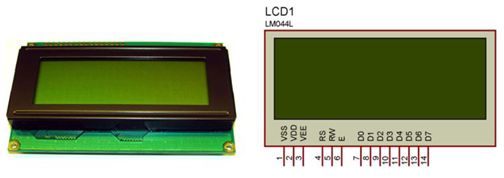 تقوم وحدات العرض LCD بعرض الحروف التى تغذى بها فى شكل كود أسكى ASCII code . بالإضافة إلى كود أسكى ، يمكنها أن تعرض الحروف المصصمة بمعرفة المبرمج ، ميزة أخرى لوحدة العرض LCD ، وهى أن ناقل توصيل البيانات الطبيعى عبارة عن 8 خطوط ، لكن يمكن إعدادها لكى تعمل فقط بأربعة خطوط للبيانات . هذه الميزة توفر من عدد الأطراف المستخدمة ولكن على حساب تقليل سرعة نقل البيانات . المكتبة الجاهزة بالميكروسى معدة لتعمل بأربعة بتات 4-bit . لعرض المكتبة الجاهزة لهذا الجهاز وللأجهزة الأخرى والمتواجدة بالميكروسى ، يجب عليك النقر على لوحة الأدوات الموجودة على الجانب الأيمن لنافذة تحرير البرنامج ، يتم التعرف على هذه اللوحة بعلامة التبويب التى تحتوى على العنوان Library Manager . عندما تنقر هذا التبويب تظهر لك نافذة بها قائمة بالمكتبات المختلفة والتى من الممكن العمل بها مع الميكروكونترولر المستخدم . فى هذه النافذة سوف تجد مكتبة باسم Lcd ، حيث يمكنك النقر على إى دالة واردة بالمكتبة لرؤية تعليمات الاستخدام المناظرة . الشكل التالى يوضح مظهر هذه النافذة : 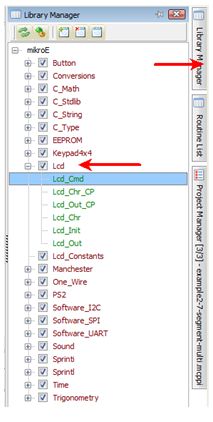 تنفيذ العرض بوحدات LCD يتطلب استخدام تسلسل من التعليمات والأوامر للإعداد والعرض ، مكتبة الميكروسى تقلل هذا العمل لأنها المسؤولة عن عمل كل هذه الإعدادات مما يجعل مهمة المبرمج أسهل . فى الخطوة الأولى لاستخدام LCD ، تحتاج لتعريف أطراف التوصيل وتنفيذ دالة بدء (تهيئة) تشغيل LCD عن طريق الدالة الجاهزة lcd_init () . تعريف الأطراف متروك للمبرمج وحسب الميكروكونترولرالمستخدم. يمكن استخدام العبارات التالية ، على سبيل المثال : كود:
// Define LCD module connections. sbit LCD_RS at RB2_bit; sbit LCD_EN at RB3_bit; sbit LCD_D4 at RB4_bit; sbit LCD_D5 at RB5_bit; sbit LCD_D6 at RB6_bit; sbit LCD_D7 at RB7_bit; sbit LCD_RS_Direction at TRISB2_bit; sbit LCD_EN_Direction at TRISB3_bit; sbit LCD_D4_Direction at TRISB4_bit; sbit LCD_D5_Direction at TRISB5_bit; sbit LCD_D6_Direction at TRISB6_bit; sbit LCD_D7_Direction at TRISB7_bit; // End LCD module connection definition وفى النهاية يجب بدء تشغيل وحدة العرض LCD داخل الدالة الرئيسية بعد إعداد المنافذ . صيغة الدالة الرئيسية تكون كما يلى : كود:
void main (void)
{
	Lcd_init (); // Start the LCD.
	while (1) // infinite loop.
	{
	}
}
كود:
// Define LCD module connections.
sbit LCD_RS at RB2_bit;
 sbit LCD_EN at RB3_bit;
 sbit LCD_D4 at RB4_bit;
 sbit LCD_D5 at RB5_bit;
 sbit LCD_D6 at RB6_bit;
 sbit LCD_D7 at RB7_bit;

 sbit LCD_RS_Direction at TRISB2_bit;
 sbit LCD_EN_Direction at TRISB3_bit;
 sbit LCD_D4_Direction at TRISB4_bit;
 sbit LCD_D5_Direction at TRISB5_bit;
 sbit LCD_D6_Direction at TRISB6_bit;
 sbit LCD_D7_Direction at TRISB7_bit;
// End LCD module connection definition


void main (void)
{
	Lcd_init (); // Start the LCD.
	while (1) // infinite loop.
	{
	}
}
تصنع وحدات عرض الحروف فى أشكال وألوان متعددة حيث تتوفر بشاشة خضراء أو زرقاء أو صفراء . ويتم عرض الحروف فى شكل مصفوفة حروف مثل 2 صف مع 16 عامود وتعرف باسم 2x16 وبنفس الطريقة يوجد 1x16, 2x16, 2x8, 2x20, 4x20 وغيرها . على سبيل المثال ، سوف نستخدم وحدة عرض 2X16 . لبدء محاكاة LCD ببرنامج إيزيس يتم جلب الأجهزة LM016L و PIC16F628A . الاسم المرجعى LM016L فى إيزيس هو لوحدة عرض 2X16 . وأخيرا يكون التوصيل كما فى الدائرة التالية: 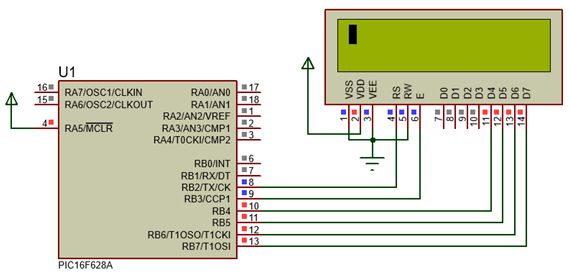 وحدة العرض LCD بها طرف يسمى VEE، هذا الطرف وظيفته التحكم فى تباين contrast الشاشة ، ولكن فى أغراض المحاكاة ليس له تأثير ، هذا الطرف يمكن توصيله بالأرضى للحصول على أعلى تباين ، بعض الشاشات تحتاج لجهد سالب خارجى للتحكم فى التباين وكلما زاد الجهد السالب كلما قل التباين . وللأغراض العملية يمكن ضبط التباين عن طريق مقاومة متغيرة . كما هو موضح بالدائرة التالية : 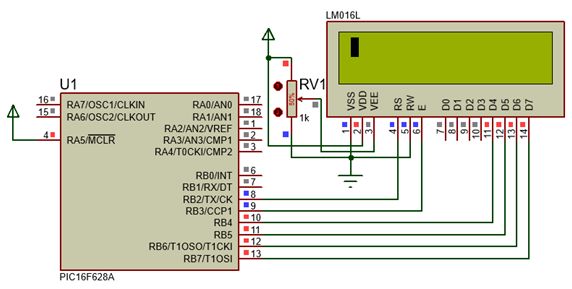 |
|
||||||
|
الخطوة التالية هى كتابة (طباعة) معلومات على الشاشة ، ولهذا الغرض يمكنك استخدام أربع دوال . دالتان منهم تسمحان لك بكتابة الأحرف characters ، والدالتان الأخريان تسمحان لك بكتابة السلاسل النصية strings . يمكنك كتابة الحروف بطريقتين ، الأولى ، ببساطة كتابة الحروف بترتيب متسلسل معروف لوحدة العرض والطريقة الثانية كتابة الحروف فى السطر والعامود الذى يحدده المبرمج . دوال كتابة (طباعة) الأحرف Functions to print characters الدالة الأولى لكتابة الأحرف هى الدالة : كود:
Lcd_Chr_Cp (char out_char); كود:
 void main (void)
{
        Lcd_init ();                	// Start the LCD.
        Lcd_Chr_Cp('H');        // These functions printed letter by letter the word "Hello".
        Lcd_Chr_Cp('e');
        Lcd_Chr_Cp('l');
        Lcd_Chr_Cp('l');
        Lcd_Chr_Cp('o');
        while (1)                  	// infinite loop.
        {
        }
}
كود:
// Lcd_Chr_Cp (char out_char);
// Prints character on Lcd at current cursor position.
//Both variables and literals can be passed as a character.

// Define LCD module connections.
sbit LCD_RS at RB2_bit;
 sbit LCD_EN at RB3_bit;
 sbit LCD_D4 at RB4_bit;
 sbit LCD_D5 at RB5_bit;
 sbit LCD_D6 at RB6_bit;
 sbit LCD_D7 at RB7_bit;

 sbit LCD_RS_Direction at TRISB2_bit;
 sbit LCD_EN_Direction at TRISB3_bit;
 sbit LCD_D4_Direction at TRISB4_bit;
 sbit LCD_D5_Direction at TRISB5_bit;
 sbit LCD_D6_Direction at TRISB6_bit;
 sbit LCD_D7_Direction at TRISB7_bit;
// End LCD module connection definition

void main (void)
{
        Lcd_init ();                	// Start the LCD.
        Lcd_Chr_Cp('H');        // These functions printed letter by letter the word "Hello".
        Lcd_Chr_Cp('e');
        Lcd_Chr_Cp('l');
        Lcd_Chr_Cp('l');
        Lcd_Chr_Cp('o');
        while (1)                  	// infinite loop.
        {
        }
}
 لكتابة حروف من خلال إحداثيات الصفوف والأعمدة نستخدم الدالة : كود:
Lcd_Chr (char row, char column, char out_char); كود:
void main (void)
{
	Lcd_init (); 	            	// Start the LCD.
	Lcd_Chr_Cp ('H'); 	    // These functions printed letter by letter the word "Hello".
	Lcd_Chr_Cp ('e');
	Lcd_Chr_Cp ('l');
	Lcd_Chr_Cp ('l');
	Lcd_Chr_Cp ('o');
	Lcd_Chr (1, 6, '1'); 	    	// prints the character 1, at row 1, column 6
	Lcd_Chr (2, 7, '2'); 	    	// prints the character 2, at row 2, column 7
	Lcd_Chr (3, 8, '3'); 	    	// prints the character 3, at row 3, column 8
	Lcd_Chr (4, 9, '4'); 	    	// Prints the character 4, at row 4, column 9
	while (1)                   		// infinite loop.
	{
	}
}
كود:
// Lcd_Chr (char row, char column, char out_char);
// Prints character on Lcd at specified position.
//Both variables and literals can be passed as a character.

// Define LCD module connections.
sbit LCD_RS at RB2_bit;
 sbit LCD_EN at RB3_bit;
 sbit LCD_D4 at RB4_bit;
 sbit LCD_D5 at RB5_bit;
 sbit LCD_D6 at RB6_bit;
 sbit LCD_D7 at RB7_bit;

 sbit LCD_RS_Direction at TRISB2_bit;
 sbit LCD_EN_Direction at TRISB3_bit;
 sbit LCD_D4_Direction at TRISB4_bit;
 sbit LCD_D5_Direction at TRISB5_bit;
 sbit LCD_D6_Direction at TRISB6_bit;
 sbit LCD_D7_Direction at TRISB7_bit;
// End LCD module connection definition

 void main (void)
{
	Lcd_init (); 	            	// Start the LCD.
	Lcd_Chr_Cp ('H'); 	    // These functions printed letter by letter the word "Hello".
	Lcd_Chr_Cp ('e');
	Lcd_Chr_Cp ('l');
	Lcd_Chr_Cp ('l');
	Lcd_Chr_Cp ('o');
	Lcd_Chr (1, 6, '1'); 	    	// prints the character 1, at row 1, column 6
	Lcd_Chr (2, 7, '2'); 	    	// prints the character 2, at row 2, column 7
	Lcd_Chr (3, 8, '3'); 	    	// prints the character 3, at row 3, column 8
	Lcd_Chr (4, 9, '4'); 	    	// Prints the character 4,at row 4, column 9
	while (1)                   		// infinite loop.
	{
	}
}
الشكل التالى يبين المحاكاة : 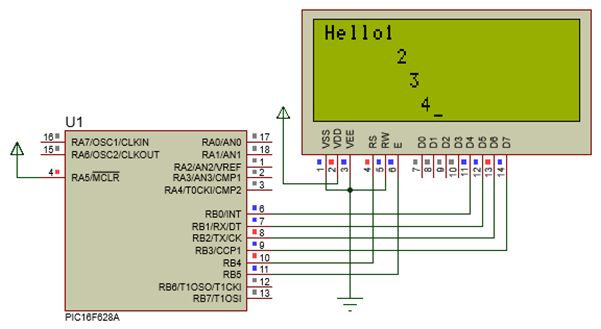 دوال كتابة (طباعة) سلاسل النصوص Functions to print text strings : أيضا كتابة السلاسل النصية إما أن يتم كتابتها فى موقع المؤشر الحالى (CP) وفق سريان الكتابة أو تكتب فى موقع يحدد بإحداثيات الصف والعامود . لكتابة سلسلة نصية عند الموقع الحالى لمؤشر الكتابة نستخدم الدالة التالية : كود:
Lcd_Out_Cp (char * text); كود:
void main (void)
{
	Lcd_init (); 				// Start the LCD.
	Lcd_Out_Cp ("Hello World ...");
	while (1) 				// infinite loop.
	{
	}
}
كود:
char Text [20] = "Hello World ..." كود:
// Lcd_Out_Cp (char * text);
// Prints text on Lcd at current cursor position.
//Both string variables and literals can be passed as a text.

// Define LCD module connections.
sbit LCD_RS at RB2_bit;
 sbit LCD_EN at RB3_bit;
 sbit LCD_D4 at RB4_bit;
 sbit LCD_D5 at RB5_bit;
 sbit LCD_D6 at RB6_bit;
 sbit LCD_D7 at RB7_bit;

 sbit LCD_RS_Direction at TRISB2_bit;
 sbit LCD_EN_Direction at TRISB3_bit;
 sbit LCD_D4_Direction at TRISB4_bit;
 sbit LCD_D5_Direction at TRISB5_bit;
 sbit LCD_D6_Direction at TRISB6_bit;
 sbit LCD_D7_Direction at TRISB7_bit;
// End LCD module connection definition

void main (void)
{
	Lcd_init (); 				// Start the LCD.
	Lcd_Out_Cp ("Hello World ...");
	while (1) 				// infinite loop.
	{
	}
}
الشكل التالى يبين المحاكاة : 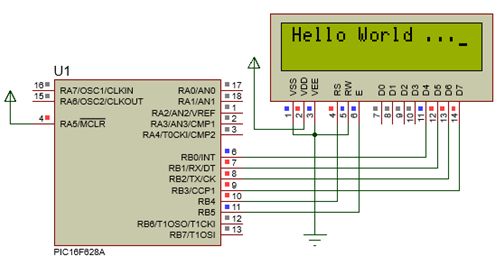 لكتابة السلسلة النصية إبتداء من نقطة إحداثيات محددة نستخدم الدالة : كود:
Lcd_Out (char row, char column, char * text); كود:
void main (void)
{
	Lcd_init (); 					// Start the LCD.
	Lcd_Out (1, 1, "Row 1, Column 1");
	Lcd_Out (2, 2, "Row 2, Column 2");
	while (1) 					// infinite loop.
	{
	}
}
البرنامج : كود:
// Lcd_Out (char row, char column, char * text);
// Prints text on Lcd starting from specified position.
//Both string variables and literals can be passed as a text.

// Define LCD module connections.
sbit LCD_RS at RB2_bit;
 sbit LCD_EN at RB3_bit;
 sbit LCD_D4 at RB4_bit;
 sbit LCD_D5 at RB5_bit;
 sbit LCD_D6 at RB6_bit;
 sbit LCD_D7 at RB7_bit;

 sbit LCD_RS_Direction at TRISB2_bit;
 sbit LCD_EN_Direction at TRISB3_bit;
 sbit LCD_D4_Direction at TRISB4_bit;
 sbit LCD_D5_Direction at TRISB5_bit;
 sbit LCD_D6_Direction at TRISB6_bit;
 sbit LCD_D7_Direction at TRISB7_bit;
// End LCD module connection definition

void main (void)
{
	Lcd_init (); 					// Start the LCD.
	Lcd_Out (1, 1, "Row 1, Column 1");
	Lcd_Out (2, 2, "Row 2, Column 2");
	while (1) 					// infinite loop.
	{
	}
}
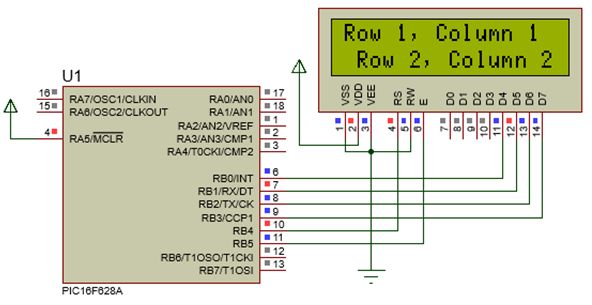 |
|
||||||
|
كتابة القيم العددية Printing numeric values : طباعة القيم العددية أمر حيوى فى العديد من التطبيقات . على سبيل المثال عندما تريد عرض حالة التغير لحساس مثل درجة الحرارة أو الرطوبة أو الضغط أو أى جهاز آخر يتم التعامل معه . لتحقيق هذا الهدف يمكن استخدام دوال التحويل الجاهزة والموجودة ضمن المترجم ميكروسى . يمكنك استخدام مكتبة التحويلات Conversions ، هذه المكتبة بها دوال تقوم بتحويل القيم العددية إلى سلسلة . عندما يتطلب الأمر عرض قيمة لعدد صحيح يتم استخدام الدالة : كود:
IntToStr (int input, char *output) ; هذه الدالة لها بارامتران هما : input وهو قيمة العدد الصحيح المراد عرضه ، و output والذى يشير إلى متغير لسلسلة نصية والذى تريد وضع نتيجة تحويل القيمة العددية input إلى سلسلة نصية فيه . يجب إعلان السلسلة المستهدفة لتكون بطول 7 أحرف على الأقل . لفهم هذا التحويل راقب وحلل المثال التالى : كود:
 void main (void)
{
	int Integer = 123;	// Declaration of an integer variable with initial value 123.
	char Text [20]; 	// String data printing , at least 7 characters in length.
	Lcd_init (); 			// Start the LCD.
	IntToStr (Integer, Text); 	// function that does the conversion.
	Lcd_Out_Cp (Text) ;	// print text on the LCD screen.
	while (1) 			// infinite loop.
	{
	}
}
البرنامج : كود:
// IntToStr (int input, char *output) ;
// Converts input signed integer number to a string.
// Define LCD module connections.
sbit LCD_RS at RB2_bit;
 sbit LCD_EN at RB3_bit;
 sbit LCD_D4 at RB4_bit;
 sbit LCD_D5 at RB5_bit;
 sbit LCD_D6 at RB6_bit;
 sbit LCD_D7 at RB7_bit;

 sbit LCD_RS_Direction at TRISB2_bit;
 sbit LCD_EN_Direction at TRISB3_bit;
 sbit LCD_D4_Direction at TRISB4_bit;
 sbit LCD_D5_Direction at TRISB5_bit;
 sbit LCD_D6_Direction at TRISB6_bit;
 sbit LCD_D7_Direction at TRISB7_bit;
// End LCD module connection definition

void main (void)
{
	int Integer = 123;	// Declaration of an integer variable with initial value 123.
	char Text [20]; 		// String data printing , at least 7 characters in length.
	Lcd_init (); 			// Start the LCD.
	IntToStr (Integer, Text); 	// function that does the conversion.
	Lcd_Out_Cp (Text) ;	// print text on the LCD screen.
	while (1) 			// infinite loop.
	{
	}
}
بعد الترجمة والمحاكاة تكون النتيجة كما فى الشكل التالى : 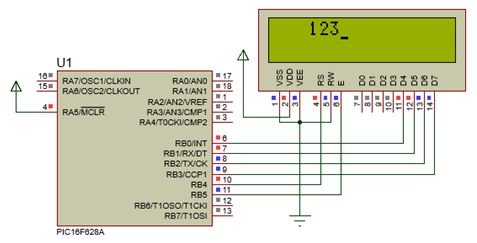 يمكن طباعة الأعداد الحقيقية ذات العلامة العشرية باستخدام الدالة : كود:
FloatToStr (float FNUM, char * str); ملحوظة : سوف يتم بتر (اقتطاع) العدد float إلى السبع أرقام ذات الأهمية القصوى قبل التحويل . يجب إعلان السلسلة المستهدفة لتكون بطول 14 حرف على الأقل . مثال : كود:
float ff1 = -374.2; float ff2 = 123.456789; float ff3 = 0.000001234; char txt[15]; ... FloatToStr(ff1, txt); // txt is "-374.2" FloatToStr(ff2, txt); // txt is "123.4567" FloatToStr(ff3, txt); // txt is "1.234e-6" كود:
void main (void)
{
	int Integer = 123;  	// Declaration of an integer variable with initial value 123.
	float Decimnal = 12.76543; 	// Declaring a variable with decimal point
				// initialized to 12.76543.
	char Text  [20]; 		// String data printing.
	Lcd_init (); 		// Start the LCD.
	IntToStr (Integer, Text); 	// Function that makes the whole conversion.
	Lcd_Out (1,1, Text);		// print text on the LCD screen.
	FloatToStr (Decimnal, Text); 	// function that does the conversion decimal.
	Lcd_Out (2,1, Text); 		// print text on the LCD screen.
	while (1) 			// infinite loop.
	{
	}
}
كود:
// FloatToStr (float FNUM, char * str);
// Converts a floating point number to a string.
// Define LCD module connections.
sbit LCD_RS at RB2_bit;
 sbit LCD_EN at RB3_bit;
 sbit LCD_D4 at RB4_bit;
 sbit LCD_D5 at RB5_bit;
 sbit LCD_D6 at RB6_bit;
 sbit LCD_D7 at RB7_bit;

 sbit LCD_RS_Direction at TRISB2_bit;
 sbit LCD_EN_Direction at TRISB3_bit;
 sbit LCD_D4_Direction at TRISB4_bit;
 sbit LCD_D5_Direction at TRISB5_bit;
 sbit LCD_D6_Direction at TRISB6_bit;
 sbit LCD_D7_Direction at TRISB7_bit;
// End LCD module connection definition

void main (void)
{
	int Integer = 123;  	// Declaration of an integer variable with initial value 123.
	float Decimnal = 12.76543; 	// Declaring a variable with decimal point
				// initialized to 12.76543.
	char Text  [20]; 		// String data printing.
	Lcd_init (); 		// Start the LCD.
	IntToStr (Integer, Text); 	// Function that makes the whole conversion.
	Lcd_Out (1,1, Text);		// print text on the LCD screen.
	FloatToStr (Decimnal, Text); 	// function that does the conversion decimal.
	Lcd_Out (2,1, Text); 		// print text on the LCD screen.
	while (1) 			// infinite loop.
	{
	}
}
الشكل التالى يبين نتيجة المحاكاة :  نفس العملية يمكن تنفيذها على الأنواع الأخرى للمتغيرات مثل : • فى حالة المتغير نوع unsigned short : كود:
ByteToStr(unsigned short input, char *output); مثال : كود:
unsigned short t = 24;
char txt[4];
...
ByteToStr(t, txt);  // txt is " 24" (one blank here)
• فى حالة المتغير (signed) short (int) أو short نستخدم الدالة : كود:
ShortToStr (short input, char * output); مثال : كود:
short t = -24;
char txt[5];
...
ShortToStr(t, txt);  // txt is " -24" (one blank here)
وفى حالة المتغير unsigned int نستخدم الدالة : كود:
WordToStr (unsigned int input, char * output); مثال : كود:
unsigned t = 437; char txt[6]; ... WordToStr(t, txt); // txt is " 437" (two blanks here) كود:
LongToStr (long input, char * output); مثال : كود:
long jj = -3700000; char txt[12]; ... LongToStr(jj, txt); // txt is " -3700000" (three blanks here) بالرجوع إلى جدول كود أسكى نجد أن كل حرف من أحرفه يقابله قيمة عددية معينة ، فحرف الصفر ‘0’ يقابلة العدد 48 ، وحرف الواحد ‘1’ يقابلة العدد 49(1+48) والحرف اثنين ‘2’ يقابله العدد 50(2+48) وهكذا ، من ثم يمكن استنتاج أنه لتحويل أى رقم إلى حرف كود أسكى المناظر يتم إضافة القيمة العددية 48 . بعبارة أخرى ، 0+48=’0’ ، و 1+48=’1’ و 2+48=’2’ وهكذا . مثال : تتبع الخطوات التالية : • إعلان متغير نوع unsigned int باسم number وإسناد قيمة ابتدائية له هى الصفر وهذا السجل سوف يحتوى على العدد المطلوب عرضه (قبل تحويله إلى كود أسكى) . • الإعلان عن متغير بالإشارة إليه بالطريقة *text وهو عبارة عن نص مكون من أربعة خانات وإسناد قيمة أصفار كقيمة ابتدائية وهو عبارة عن مصفوفة صف بها 4 عناصر . كود:
unsigned int number = 0; // Integer number char *text = "0000"; // Pointer to string # استخلاص قيمة رقم خانة الآلاف بقسمة العدد number على1000 ويضاف إلى النتيجة العدد 48 لتحويله إلى كود أسكى وحفظ النتيجة كأول عنصر من عناصر المصفوفة text[0] . # استخلاص قيمة رقم خانة المئات بقسمة العدد number على 100 ثم إيجاد باقى خارج قسمة الناتج على 10 والنتيجة النهائية يتم تحويلها إلى كود أسكى بإضافة 48 وحفظ النتيجة كثانى عنصر من عناصر المصفوفة text[1] . # استخلاص قيمة رقم خانة العشرات بقسمة العدد number على 10 ثم إيجاد باقى خارج قسمة الناتج على 10 والنتيجة النهائية يتم تحويلها إلى كود أسكى بإضافة 48 وحفظ النتيجة كثالث عنصر من عناصر المصفوفة text[2] . # استخلاص قيمة رقم خانة الآحاد بإيجاد باقى خارج قسمة العدد number على 10 والنتيجة يتم تحويلها إلى كود أسكى بإضافة 48 وحفظ النتيجة كرابع عنصر من عناصر المصفوفة text[3] . # وأخير يمكن عرض هذه المصفوفة على وحدة العرض LCD ، على سبيل المثال ، فى الصف الثانى بدءا من العامود السابع كما يلى : كود:
void Display ()   // define display_init;
{
 text[0] = number/1000 + 48;           		// thousands digit, ASCII
 text[1] = (number/100)%10 +48;        	// hundreds digit, ASCII
 text[2] = (number/10)%10 + 48;       	 // tens digit ASCII
 text[3] = number%10 +48;              	// unit digit ASCII;
 Lcd_Out(2,7, text);                    		// display on LCD from Row 2, character 7
}
|
|
جميع الحقوق محفوظة 2026
|


