قسم صيانة شاشات LCD و البلازما و LED و OLED صيانة شاشة الكرستال المسطحة , البلازما , LCD , Plasma , Plazma , بلازما , فلات , L.C.D , LED , OLD


سمير حسانين
:: عضو ذهبي ::
تاريخ التسجيل: Aug 2007
الدولة: مصر- المنصورة
المشاركات: 2,128
نشاط [ سمير حسانين ]
قوة السمعة:
قديم 04-08-2010, 02:31 AM المشاركة 1   
افتراضي طريقة صيانة شاشة Dell 17


منقول للافادة

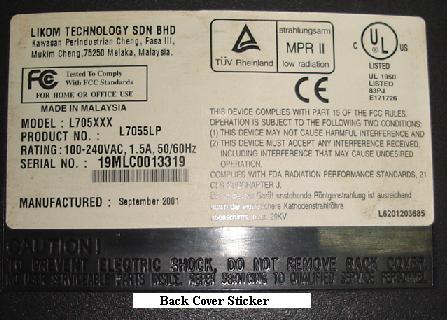
How To Repair Dell 17" (Likom

L705XXX) Monitor With No Power Symptom


This DELL 17” Monitor (Made in Malaysia under LIKOM model L705XXX, product no: L7055LP) came in with no power symptom. Normally after opening up the cover I would look at the power supply (primary side) for any burnt and cracked components first. If there are darkened area and burnt components, I would tell myself that this Monitor needs a little more time to repair it. If it is not (component’s intact) I would usually begin to discharge the filter capacitor and start checking the fuse.
Okay, it is confirmed that all the primary side components looks good in this Monitor.
First, discharge the big fat filter capacitor with a resistor (I know that the voltage already drained off but it is a normal procedure for me because what if the start up resistor has an open circuit?) then check the fuse.


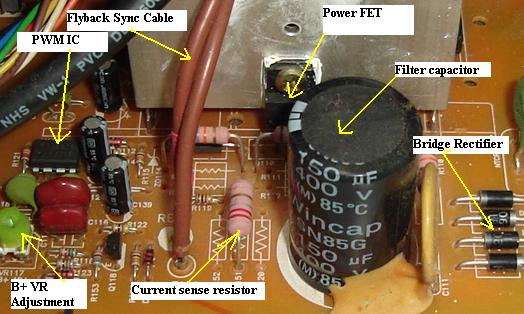
If the fuse is okay, experience will tell you that the bridge diodes are also working fine. Place your black probe of your analog meter set to x1 to the center pin (drain) of the power FET and red probe to the other pin one at a time (gate and source). If the pointer of the meter doesn’t kick then 80 % of the Power FET is okay. If you want to 100% confirm if it is good then you have to solder it out and test. If the pointer shows a reading then most probably the power FET has developed a short circuit. The result that I got from this Monitor was the pointer don’t flick.
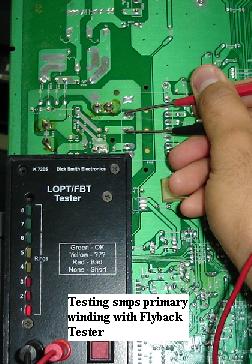
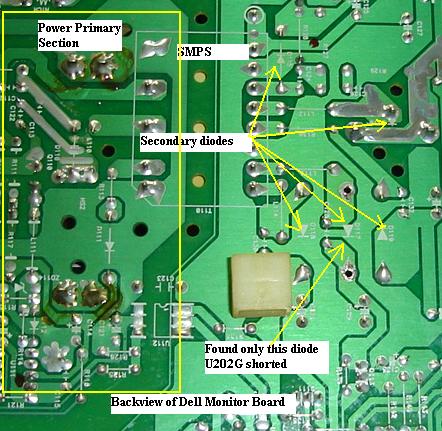
Now is the time for me to use the dick smith flyback tester to check the smps primary winding. The result that I got was, the led bar don’t lit. Ah ha! That was a clue and this clue tells you that it is either the smps primary winding is shorted or one of the secondary diodes has given way. Of course you can check all the secondary diodes with your normal multimeter first (remember, every electronic repairers have their own procedure methods of troubleshooting) but I prefer this way as I want to confirm also if the smps primary winding is working or not.

Usually smps transformer is very robust thus I didn’t suspect it to pull down the flyback tester reading. I straight away check all the secondary diodes with my analog meter and found one diode shorted (part number U202G). Since I do not have this part number, I use a UF5404 ultra fast recovery diode as a replacement. In fact I use this UF5404 to all 14 to 17” Monitor as a replacement for all part number of secondary diodes. The spec of this diode was 400volt, 3 Amp with 50 nanosecond.
After the replacement of the diode, and placing the flyback tester probes again to the primary winding, the result shows full bar on the LED. Don’t be happy with the result yet because your job still hasn’t done.

Now I moved on to check HOT with the same procedure as checking the power FET. The HOT checked to be okay too. Next, I check the internal capacitance of the flyback transformer to see it is shorted or not or is the capacitance value run. For your information, internal capacitor in flyback transformer gave lots of problems in computer Monitor. I also scanned thru the B+ FET and found it to be good too.


Now is the time to switch on the Monitor, however this round I don’t connect any bulb because it was only a shorted diode in the secondary side. I would only connect a light bulb after repair when there is major short circuit in the primary side such as a blown bridge rectifier, shorted fet and smps primary winding and also burnt components in the board.

The DELL 17” Monitor worked beautifully and after long hours of burn-in test, I declared it okay and ready to send back to my loyal customer. Isn’t it fun to be able to repair a Monitor and at the end you get paid for something you like doing. I just love electronic repair!

اعلانات

سمير حسانين
:: عضو ذهبي ::
تاريخ التسجيل: Aug 2007
الدولة: مصر- المنصورة
المشاركات: 2,128
نشاط [ سمير حسانين ]
قوة السمعة:
قديم 04-08-2010, 02:34 AM المشاركة 2   
افتراضي


وهذا موضوع أخر
Viewsonic Monitor Problems-CRT or The Degaussing Circuit?


This Viewsonic 15” Monitor came in with the complaint of color problem in the whole display. Some techs called it as rainbow display while some referred to it as color patches fault. This problem usually were related to a bad picture tube (due to a fall that caused the internal shadow mask to come out from the original location) or from a faulty degaussing circuit.

The degaussing circuit consists only of the Posistor, degaussing coil and a relay (depends on designs). Digital Monitors are using the microprocessor to trigger the relay through a NPN transistor (C945) in order to activate the degaussing circuit.


Now, whenever I see this problem I would normally first use a demagnetizer to degauss (to make the color problem (purity) to be even again). If the Monitor color patches still remain the same (no changes) then it is confirm that the Monitor CRT is at fault. There is no way to solve the bad CRT problem unless you replace it with a used or a new pc tube. If the display color can get back to normal again, then most probably the degaussing circuit has problems.

Some common problems that can happen in the degaussing circuit were dry joints (very high percentage) especially at the leads of the Posistor and a defective Posistor. You can’t test a Posistor with a normal multimeter. The only method to check it is direct replacement and retest again to see if the color problem symptom has gone away or not. If you can’t find any dry joints in the degaussing circuit, chances are very high that the Posistor may have problem. Sometimes you can remove the Posistor from the board and shake it to hear if there any loosen materials inside the Posistor. A good working Posistor should not produce a loud noise.


As for the degaussing coil, you can easily unplug the coil and test it with an ohmmeter. I came across before an open coil but the problem was very rare. You may also test the degaussing coil with the Dick Smith flyback tester. A good coil should show at least 3-4 bars and above! Assuming the problem was can’t degauss the picture tube and the Posistor and the degaussing coil you had checked to be okay, then suspect a bad relay or the circuit that trigger the relay. It could be the microprocessor is not sending the signal or the faulty NPN transistor along the circuit.


Overall, color patches problem is not difficult to repair but you must understand how the circuit works first. Many times, Monitor repairer confused about the symptom. For example- if you could see a display (character) with color patches then it is either a bad CRT or a degaussing circuit. If you could not see the display character but with color patches then suspect a defective vertical section. I had solved lots of the problem (no display character but with color patches) by changing the vertical IC and resoldering the circuit. Please take note on this complain! The Viewsonic Monitor problem that mentioned above was actually solved by replacing only the Posistor.

اعلانات اضافية ( قم بتسجيل الدخول لاخفائها )

الصورة الرمزية الباسم.حسن يوسف
الباسم.حسن يوسف
::

" الاب الفقيد "

::
تاريخ التسجيل: Mar 2007
المشاركات: 5,517
نشاط [ الباسم.حسن يوسف ]
قوة السمعة:
قديم 04-08-2010, 04:20 AM المشاركة 3   
sun


بسم الله الرحمن الرحيم

أخى مهندس / سمير حسانين

نشكرك على أمانتك ونشكرك على الموضوع
ونتمنى أن يفيد كثيريين من الزملاء والأعضاء تحياتى اليك


الصورة الرمزية احمد حمادي
احمد حمادي
:: مشرف ورشة التلفزيون ::
تاريخ التسجيل: Mar 2009
الدولة: فلسطيني/ لبنان
المشاركات: 6,655
نشاط [ احمد حمادي ]
قوة السمعة:
قديم 05-08-2010, 09:39 PM المشاركة 4   
افتراضي


بسم الله الرحمن الرحيم

أخى مهندس / سمير حسانين

نشكرك على أمانتك ونشكرك على الموضوع

ونتمنى أن يفيد كثيريين من الزملاء والأعضاء تحياتى اليك
مشكور ونتمنى المزيد


احمدمصطفى
:: مهندس متواجد ::
تاريخ التسجيل: Nov 2011
المشاركات: 116
نشاط [ احمدمصطفى ]
قوة السمعة:
قديم 25-04-2012, 03:03 AM المشاركة 5   
افتراضي


السلام عليكم ارجو الاسعاف او النجدة فى رقم بور الاين شاشة DELL موديل E773p ولكم جزير الشكر


الساعة معتمدة بتوقيت جرينتش +3 الساعة الآن: 07:40 PM
موقع القرية الالكترونية غير مسؤول عن أي اتفاق تجاري أو تعاوني بين الأعضاء
فعلى كل شخص تحمل مسئولية نفسه إتجاه مايقوم به من بيع وشراء وإتفاق وأعطاء معلومات موقعه
التعليقات المنشورة لا تعبر عن رأي موقع القرية الالكترونية ولايتحمل الموقع أي مسؤولية قانونية حيال ذلك (ويتحمل كاتبها مسؤولية النشر)