منتدى المشاريع و الدوائر الإلكترونية صناعة وتصميم وانشاء مشاريع و دوائر الكترونية


احمدعبدالباقى
:: مهندس متميز ::
تاريخ التسجيل: Jun 2009
الدولة: مصر .. البحيرة
المشاركات: 662
نشاط [ احمدعبدالباقى ]
قوة السمعة:
قديم 26-01-2010, 08:01 PM المشاركة 1   
yel اعرض محتويات كمبيوترك على التليفزيون بتحويل vga الى av


Connecting your Computer to a Television

It is a nasty surprise when you switch your monitor on and nothing appears on screen after a patient wait. Even though the resolution is much low, a television may help you to conduct basic procedures (copying your files for example) in such an emergency. You may think that this is only possible through expensive VGA cards but it's not true. A simple circuit can combine the VGA synchronization signals into composite TV synchronization signal. Following circuit by Tomi Engdahl carries out this job successfully without any problems. It utilizes a TTL IC, two transistors and a few resistors.


By putting all of the components on a PCB makes it easier to prepare a portable VGA to TV adapter. You'll need a male VGA connector to be connected to your PC and a Scart connector for your TV. Six lines of cable goes from VGA Card to TV without any alteration, only three of them is needed to be connected to the PCB board. Here is a PCB design I suggest using. Download this TIFF file which is set to be printed at 300DPI. You may refer to my PCB design page to learn how to create your own PCB arts on the computer.


PCB design for the converter

You'll need VGA connector's and Scart's pinouts also, so here they are. Check out Nikola Asuni's award winning excellent web site of great pinout collection and other information on electronics.


Pinouts for VGA Connector


Pinouts for SCART Connector

Since circuit does not utilizes high currents, a very thin PCB plate would be enough. After drawing and etching processes, drill the holes and solder the components. Attach wires to the proper connection points and apply +5V supply voltage. If there's nothing wrong, you should measure nearly 75 mA current drag for a 74LS86 low power Schottky TTL type IC and again nearly 100 mA current drag for a 74S86 type IC.


PCB completed and VGA connector attached

Since sweeping frequencies of the VGA boards are higher than the TV's, a software is needed to alter it. Here is one called Television Eyes which both enables you to use circuit in DOS and Microsoft Windows (at 640 x 480 resolution). Just start your PC in DOS mode and run 'te.com' to install it as a TSR. If you press ALT - Left SHIFT - E keys simultaneously, the sweeping frequency of the VGA board will be changed and your TV will be able to sync the signal it receives. Here are screenshots showing the unsynched and synched states of the TV screen displaying DOS.


Screen output on TV before and after the synchronization

Text mode applications on DOS works pleasant, as long as they are not have details too much. For example good old Norton Commander looks very good on the TV. After switching the Windows to 640 x 480, 16 colors mode (standard VGA) and applying 'te.com' after a reboot, you may be able to view Windows too. File 'winte.exe' enables/disables the frequency alteration and makes it possible to adjust alignment of the screen.


Norton Commander and Windows on the TV

Picture quality is worse in Windows that even texts of the icons are unreadable. But as stated earlier, this work is intended to make it possible to use your PC in case of a monitor emergency. To blind-boot your PC in such an emergency condition; prepare a .BAT file with a simple name (for example 't.bat' ) which calls the te.com where it is located. Than you can connect the circuit to your PC and TV, boot the computer in DOS mode, and type 't' then press ALT - Left SHIFT - E to get everything in order.

اعلانات

احمدعبدالباقى
:: مهندس متميز ::
تاريخ التسجيل: Jun 2009
الدولة: مصر .. البحيرة
المشاركات: 662
نشاط [ احمدعبدالباقى ]
قوة السمعة:
قديم 26-01-2010, 08:04 PM المشاركة 2   
افتراضي


وترجمة الصفحة

http://translate.google.com.eg/trans...tm&sl=en&tl=ar

والمصدر

http://tacashi.tripod.com/elctrncs/vga2tv/vga2tv.htm

الموضوع للمناقشة لانى لم انفذ الدائرة ولكنى ارغب فى تنفيذها لكنى انتظر راى الخبراء والاساتذة الكبار فى القرية

وتحياتى للجميع

اعلانات اضافية ( قم بتسجيل الدخول لاخفائها )

الصورة الرمزية daoud
daoud
:: عضو فضي ::
تاريخ التسجيل: Feb 2004
الدولة: الجــزائـــــر
المشاركات: 510
نشاط [ daoud ]
قوة السمعة:
قديم 26-01-2010, 11:56 PM المشاركة 3   
افتراضي


يا سلام عليك يا شيخ عبد الباقى
مشكور جدا على سعيك فى اثارة بعض المواضيع
التى كثرا ما تنتاب خواطر الاخوة حياك الله و رعاك
و حفظك من كل سوء

مخطط الدارة فى مشاركتك غير واضح قد يرجع لانتهاء مدة رفع الصورة

----------------
لا استبعد مطلقا نجاح الدارة التى تفضلت بها اخى عبد الباقى
بحثت عنها وقد وجدت

اليكم بها


قائمة العناصر الـلازمة :

U1: 74LS86

C1: 22mF

C2: 2,2 mF

R1, r2: 2k2

R3, r4, r5: 2k2

R6, r7, r9: 47k

R8: 120

T1, t2: 2N2222

Cable of connection VGA male 15pin sub D (DE 15)

Output connector 21pin EURO/scart female


الدارة بسيطة تعتمد فى عملها على مزج اشارتي التنسيق
الخارجة من مخرج VGA لجهاز الكمبيوتر
اقصد باشارتي التنسيق :
اشارة المسح الافقى و اشارة المسح العمودي

اما الالوان الثلاثة فيتم توصيلهما مباشرة الى مدخل التلفاز

لازم يكون التلفزيون يحتوي على هذا المدخل
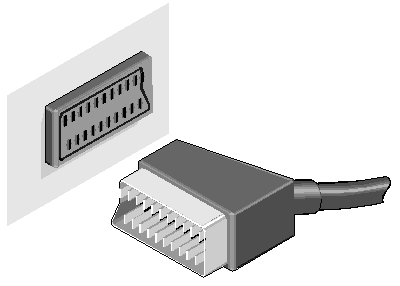


اذن هذه الدارة تصلح للتوصيل عن طريق scart connector tv فقط


----


--


التعديل الأخير تم بواسطة : daoud بتاريخ 27-01-2010 الساعة 12:07 AM

احمدعبدالباقى
:: مهندس متميز ::
تاريخ التسجيل: Jun 2009
الدولة: مصر .. البحيرة
المشاركات: 662
نشاط [ احمدعبدالباقى ]
قوة السمعة:
قديم 27-01-2010, 12:15 AM المشاركة 4   
افتراضي


بارك الله فيك على التوضيح الرائع

والمداخلة القيمة جداجداجدا


emad1
:: موقوف ::
تاريخ التسجيل: Nov 2005
الدولة: Usa
المشاركات: 2,333
نشاط [ emad1 ]
قوة السمعة:
قديم 27-01-2010, 10:49 PM المشاركة 5   
افتراضي


daoud مشكور على التوضيح ولكن ممكن ترسم الدائرة كما عوتنا برسوماتك الرائعة يعني تنفيذها كصورة .


التعديل الأخير تم بواسطة : emad1 بتاريخ 28-01-2010 الساعة 12:29 AM


الساعة معتمدة بتوقيت جرينتش +3 الساعة الآن: 06:40 AM
موقع القرية الالكترونية غير مسؤول عن أي اتفاق تجاري أو تعاوني بين الأعضاء
فعلى كل شخص تحمل مسئولية نفسه إتجاه مايقوم به من بيع وشراء وإتفاق وأعطاء معلومات موقعه
التعليقات المنشورة لا تعبر عن رأي موقع القرية الالكترونية ولايتحمل الموقع أي مسؤولية قانونية حيال ذلك (ويتحمل كاتبها مسؤولية النشر)