 |
:: عضو فضي ::
تاريخ التسجيل: Apr 2010
الدولة: جميلة سطيف الجزائر
المشاركات: 413
|
|
نشاط [ mahdi901 ]
قوة السمعة:
|
|
 17-12-2014, 10:23 PM
المشاركة 1
|
|
 مود سرفيس وضبط samsung ds17bs tft lcd monitor
السلام عليكم اليكم اخواني الكرام طريقة السرفيس مود لمونيتر سامسونج
SAMSUNG DS17BS - TFT-LCD MONITOR - SERVICE MODE AND ADJUSTMENTS
How to enter service mode and adjust data values to Samsung DS17BS - TFT-LCD MONITOR

SERVICE MODE
* Display Service Function OSD
* The value for brightness and contrast should be changed to zero.
* Within 5 seconds, press the exit key.
Service function OSD will be displayed.
If you want to disable the service function OSD, you will have to power off.
> The service function OSD is based on a grid of 29 columns x 12 rows.
> The service function OSD consists of panel information, software version and MICOM check sum.

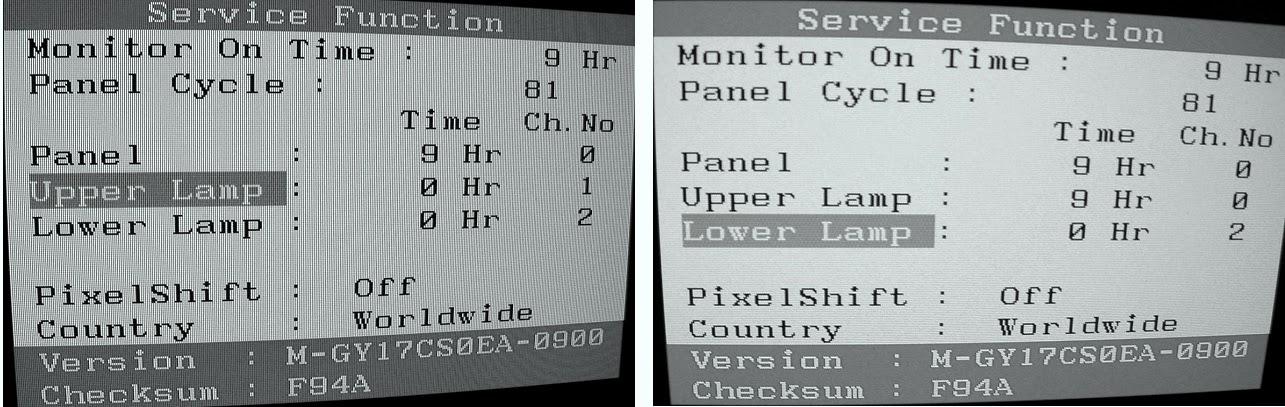
With the panel selected on OSD, whenever you press the right key, the base color will change to blue from “Panel” to “Country”, “Pixel Shift”, “Lower Lamp”, “Upper Lamp”.

How to Control Service Function OSD
After change the panel or lamp, you must reset service function OSD.
The case of panel change
* After changing the panel, press the menu key within 5 seconds,.
* Then, panel Ch. No increases one step and the panel time information is reset to zero.
Simultaneously, other information is reset to zero (Upper/Lower lamp, Panel cycle).

In the case of Upper Lamp or Lower Lamp change
After changing the Upper Lamp or Lower Lamp,
* Select the Upper Lamp or Lower Lamp
* Press the Menu key within an 5 seconds.
Then, Ch. No and time will be reset to zero (selected item only)
Pixel shift and language selection change
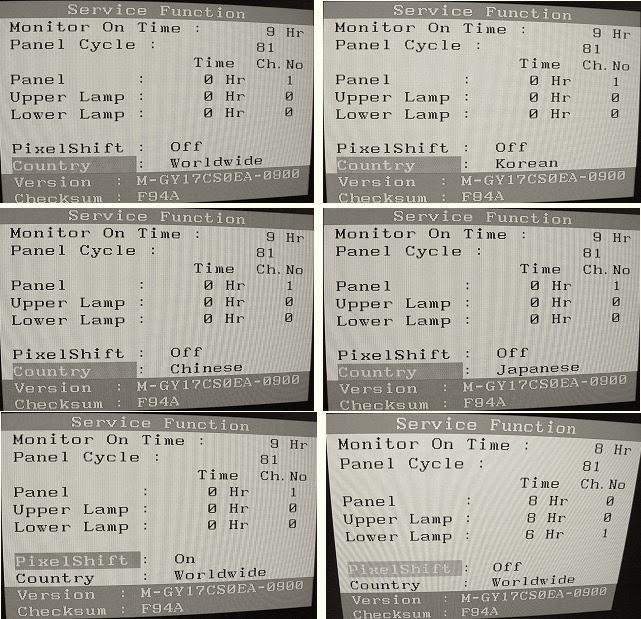
Note: Use the '-' key to vary values for new pixel shift and country menu.
1. Pixel shift: on off.
> When a same picture is displayed with no change for an extended period of time, this function prevents the display panel from image sticking.
# On for '0 x 01' with EEPROM 0x2E, Off for others; Always restart the monitor after EEPROM adjustment.
> Motion path: see Figure. One-step movement requires 4 minutes (total of 32 steps: 128 minutes)

> Location is reset.
a) the monitor is restarted
b) image mode is adjusted
c) user adjusts a key
Note : Pixel shift is not a available in service menu.
2. Country : Worldwide Korean Chinese Japanese
> This function enables to select relevant OSD language for each region / country.
> Worldwide : 7 languages (English, German, Spanish, French, Italian, Swedish, Russian)
> Korean : 2 languages (Korean, English)
> Chinese : 2 languages (Simplified Chinese, English)
> Japanese : 2 languages (Japanese, English)
 [/SIZE][/CENTER]
|


